
Google Business Profile for chiropractors: setup, optimisation and local visibility
Optimise Google Business Profile for chiropractors in Australia. Manage reviews, track enquiries and use the 25-point audit checklist.
Australian chiropractic clinics can optimise an eligible Google Business Profile by verifying the correct listing, choosing accurate categories and services, maintaining clinic details, and testing phone and booking links. Follow Google’s policies and Australian health advertising requirements, then measure profile interactions, validated enquiries and appointments confirmed in the practice’s booking system separately. These steps support local visibility but cannot guarantee Google Maps rankings or new appointments.
What does a Google Business Profile do for a chiropractic clinic?
A Google Business Profile is a free listing that lets eligible chiropractic clinics manage their information in Google Search and Maps. Eligible individual chiropractors may also have practitioner profiles. A website is not a prerequisite, although it can provide more detailed service and booking information.
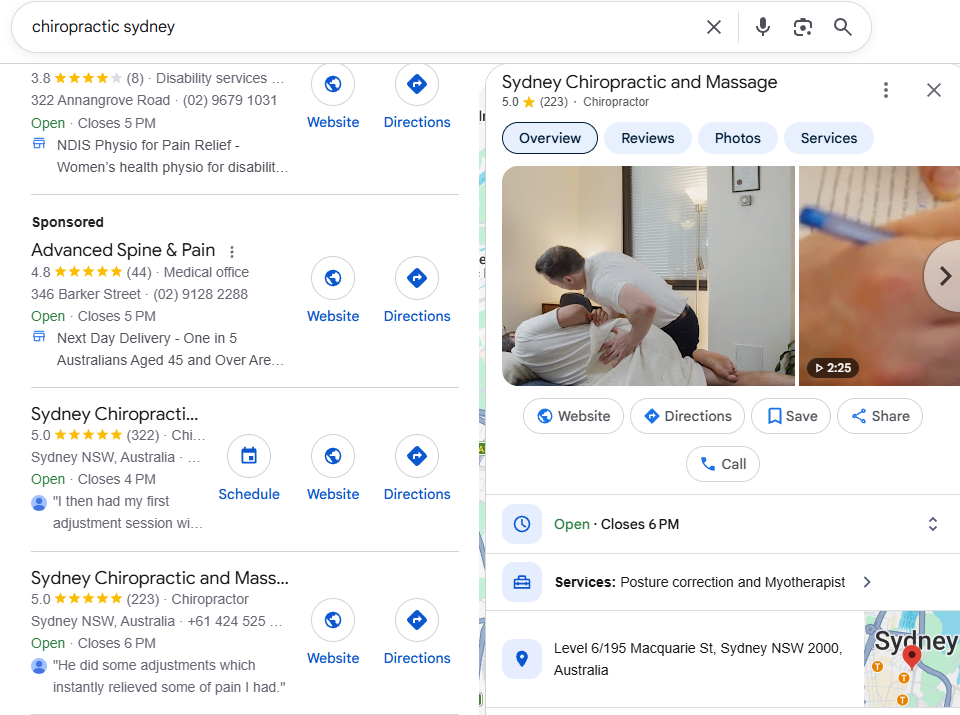
The profile helps prospective patients at three stages:
- Discovery: find the clinic and its location.
- Decision: check services, opening hours, photos and access information.
- Action: call, visit the website or open an available booking link. A click is not an appointment.
How can a chiropractic clinic set up and optimise its Google Business Profile?
Start by establishing ownership, eligibility and accurate clinic information before investing in additional posts or photos.
- Search for the current or former clinic name and address to identify existing listings.
- Confirm eligibility, establish clinic-controlled access and complete the verification method Google offers.
- Check the business name, categories, services, contact details, hours, photos and links.
- Review clinical claims, review practices and privacy risks under Australian requirements.
- Test the mobile enquiry journey and record baseline profile interactions and confirmed enquiries.
Record each correction, its owner and how it was retested.
Claim and verify the right clinic profile
Search Google Search and Maps for the existing clinic profile before creating another listing.
| What you find | Recommended next step |
|---|---|
| Existing unverified clinic listing | Claim that profile; follow the verification options shown. |
| Existing verified listing, unknown owner | Use Google’s ownership-request process and establish authorisation. |
| No listing for a genuinely new clinic | Check eligibility and real-world premises before adding a profile. |
| Two profiles for one clinic | Check whether they represent distinct eligible entities before seeking a resolution. |
For a verified profile owned by another account, request ownership. Google gives the current owner three days to respond. If refused, use any available appeal process; if unanswered, Google may offer a claim or verification option. Google determines the available verification methods, so follow the instructions in the account rather than promising a particular method.
Ownership control: Keep primary ownership with an authorised clinic account and grant agencies role-appropriate access. Record the profile identifier, primary owner, managers, verification status, access-request date and recovery contact. Verify the handover and review former agency access. Manager access alone does not establish primary ownership. Never share personal passwords.
Choose accurate categories and chiropractic services
Select the primary category that describes the actual practice, generally “Chiropractor” where available. Add other categories only for business types the clinic genuinely operates, not simply to target additional keywords.
List real services approved by the clinical lead. For example, “Initial chiropractic consultation” describes a service; “Guaranteed cure for sciatica” makes an inappropriate outcome promise. Before publishing a treatment claim, record the exact wording, the clinical aspect being claimed, acceptable supporting evidence, necessary qualifications and the approving clinician or qualified reviewer. Remove or rewrite unsupported claims rather than using patient reviews as evidence.
Keep services, practitioner information and the website consistent. Use the clinic’s real-world name without extra suburb names or promotional keywords.
Keep clinic details, opening hours and booking links correct
Check each clinic’s business name, address, map pin, telephone number, regular and special opening hours, website and appointment links. Include genuine photos and accurate accessibility and parking details.
Branch-to-booking test: On a phone, follow the website or appointment link. Check the destination, branch, practitioner options and booking steps. Record the device, link, expected branch, observed destination and errors. Verify confirmation in an authorised test environment where available; otherwise stop before making a live appointment and ask the administrator how bookings are confirmed. Never submit real patient details during marketing tests.
Retest after changes to the booking provider, services, rosters, location, hours or phone number. A provider homepage alone does not establish a working branch-specific booking route. A monthly inspection can help, but Google does not require that schedule.
What affects Google Maps visibility for chiropractors?
Google describes local ranking mainly through relevance, distance and prominence. Clinics can improve their information and online presence, but cannot control a searcher’s location or buy a guaranteed organic Maps position.
| Factor | What the clinic can check | What it cannot control |
|---|---|---|
| Relevance | Accurate categories, services and website details that reflect the real practice. | Whether Google treats a particular query as relevant in every context. |
| Distance | The genuine address, pin and branch identity. | The searcher’s location or the relative distance of competing clinics. |
| Prominence | Accurate public presence, genuine reviews and relevant information from across the web. | A guaranteed position from posting frequency, photo counts or review targets. |
Record the query, search location, device and date when checking Maps visibility. A single result does not establish a city-wide ranking or performance trend. Compare visibility with verified enquiries over time.
How should Australian chiropractic clinics manage Google reviews?
Request genuine, unbiased feedback without incentives, pressure or selective requests for positive reviews. Google’s review policy governs collection; Ahpra’s advertising requirements separately restrict testimonials about clinical aspects of regulated health services.
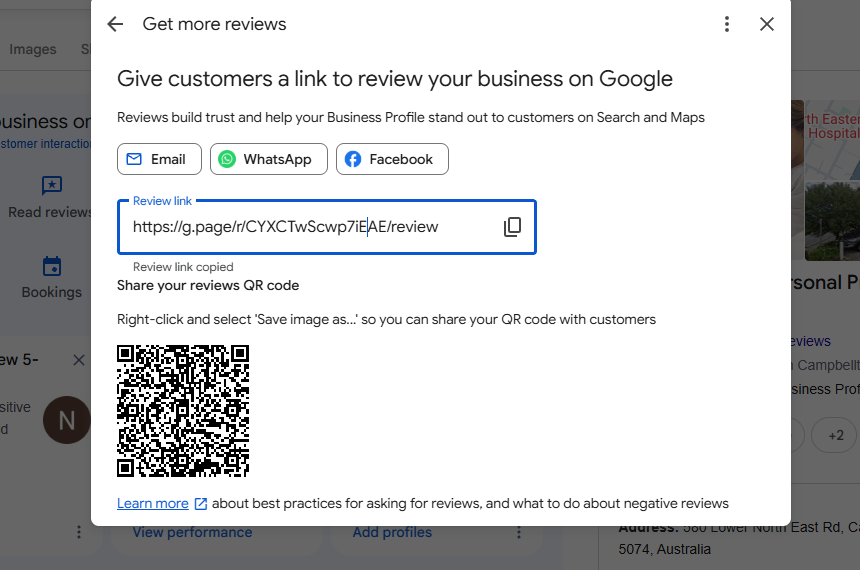
Before reusing feedback, ask: Does the clinic control this publication or promotion, and does the statement describe clinical care, treatment or outcomes? Do not use clinical testimonials in controlled advertising. Independent third-party reviews differ from reviews the clinic selects or republishes. Administrative feedback still requires accuracy and privacy checks.
| Situation | Practical decision |
|---|---|
| Unprompted review appears on an independent platform | Check whether the clinic controls or promotes that placement; do not assume independently hosted feedback is clinic advertising. |
| Clinic offers a discount for a five-star review | Do not do this; it conflicts with Google’s fake-engagement rules. |
| Clinic wants to feature “my pain disappeared” on its website or advertisement | Do not reuse this clinical-outcome testimonial in regulated-health advertising. |
| Review contains a complaint or apparent health details | Protect confidentiality and use a neutral escalation route rather than discussing care publicly. |
Set a policy for requesting reviews, authorised responses and escalation. Seek advice from an appropriately qualified Australian health-advertising professional for uncertain claims or testimonial use. Ahpra does not pre-approve individual advertising.
Reply to reviews without exposing patient information
Do not confirm patient status, identify appointments, disclose symptoms or treatment, or repeat clinical outcomes in public responses, even if the reviewer volunteers those details.
Example: “Thank you for your feedback. Please contact our practice manager directly so we can discuss your concern privately.”
Use an approved response policy. Negative opinions alone do not breach Google’s rules. Check suspected fake reviews against platform reporting criteria; refer clinical complaints to an authorised practice manager privately and record escalation status.
Apply the same advertising and evidence checks to your chiropractic service pages.
When does a clinic need separate practitioner or location profiles?
A practice generally needs one eligible profile for each genuine operating location. Google distinguishes organisations, individual practitioners and separate branches. Individual chiropractors must meet practitioner eligibility rules, including direct contact at their verified location during stated hours.
| Practice arrangement | Profile decision to verify |
|---|---|
| One public-facing chiropractor at a branded practice | Google generally recommends one shared profile named “Brand: Practitioner name”; check that the real clinic and practitioner details meet its rules. |
| Several public-facing chiropractors at one location | The practice has a location profile; eligible practitioners may also have individual profiles if directly contactable there. |
| Several genuine, staffed clinic branches | Each eligible branch can have its own accurately named location profile, address and patient contact route. |
| Virtual mailing address or unstaffed referral point | Do not claim a clinic branch at that address. Check distinct service-area eligibility only if the business genuinely visits customers. |
For multiple practitioners, individual profile names should not include the organisation name. Support staff and separate treatment techniques do not qualify for practitioner profiles.
A rented mailing address or virtual office does not establish a clinic branch. Co-working premises require clear signage, staffing by the business and customer contact during stated hours. Genuine service-area businesses have different eligibility and address-display rules; they cannot use fictitious suburb offices as additional branches.
Departure scenario: When a chiropractor changes practice, verify individual profile ownership, address, contact routes and Google’s applicable rules before editing. Do not rename the former clinic as the practitioner or assume reviews belong to the new clinic.
For groups, maintain a branch register with verified addresses, profile identifiers, website pages, booking destinations and authorised managers. Plan location-specific pages and booking routes as part of your chiropractor website design.
How can a clinic measure Google Business Profile enquiries and confirmed bookings?
Compare Business Profile activity with validated enquiries and authorised booking records. Google’s Business Profile performance data may include activity from both organic search results and Google Ads. A call-button click is not a connected call; a website-link click is not a confirmed site session or appointment.
| Signal | Source | What it establishes |
|---|---|---|
| Profile views | Google Business Profile Performance, when available for a verified profile | Views of the profile on Search and Maps under Google’s counting rules; not enquiries or necessarily organic-only traffic. |
| Search terms | Google Business Profile Performance, when available | Queries associated with finding the profile; not clicks, sessions or appointments. |
| Call-button clicks | Google Business Profile Performance | Clicks on the call control, not connected or answered conversations. |
| Website-link clicks | Google Business Profile Performance | Clicks on the profile’s website link, not proof that the website loaded or a session was recorded. |
| Attributed website sessions | Website analytics, if correctly configured | Site activity attributed to the profile link under the analytics platform’s tagging, consent and attribution rules. |
| Google-reported bookings | Google Business Profile Performance, where supported through a booking provider | Bookings reported through a supported provider; availability and counting may differ from the clinic’s own appointments. |
| Practice-confirmed appointments | Authorised practice booking system | Accepted appointments from the clinic’s records, not proof of attendance or new-patient status. |
| Attended new-patient appointments | Authorised, aggregated practice operations report | An operational outcome if accurately defined and reconciled; not a routine GA4 event. |
For an organic profile website link, an illustrative UTM convention is utm_source=google, utm_medium=organic, utm_campaign=gbp and utm_content=sydney for the branch. Apply your agreed naming convention, test the destination and confirm the campaign in GA4’s Traffic acquisition report. Do not apply organic tagging to paid traffic. Some booking providers lose attribution; Google Performance and GA4 will not necessarily match. Google-reported bookings depend on supported providers, while practice records establish accepted, cancelled or attended appointments.
Keep patient details, symptoms, appointment notes and identifiable booking IDs out of analytics and advertising platforms. Audit third-party analytics and advertising scripts, including network requests, URLs, referrers and event parameters, for unintended disclosures. The OAIC has highlighted health-site tracking-pixel risks. Review privacy notices, access controls, lawful collection and any required consent against OAIC guidance; a cookie banner alone is not sufficient. Obtain appropriate privacy or legal assessment before enabling risky tracking.
Separate calls and booking clicks from completed appointments
Count contact attempts, completed conversations and confirmed appointments separately. For example, two call taps, one reception conversation and a booking-page visit may result in just one accepted appointment, not four new patients.
Reporting sequence: Profile interaction → verified contact → valid enquiry → accepted appointment → attended first appointment.
Agree definitions for duplicate enquiries, missed calls, cancellations, reschedules and new patients with the practice manager. Use authorised booking records and privacy-safe aggregate totals to compare branches. Use GA4 enquiry tracking to validate website contact actions separately from practice-confirmed appointments. Report unmeasurable interactions as unmatched rather than forcing attribution. Never upload patient lists or health data to GA4 or advertising systems to close attribution gaps.
Chiropractic Google Business Profile audit checklist
Use the interactive checklist to audit your clinic’s profile. Prioritise ownership, eligibility and booking issues. Record each unresolved issue, observed evidence, risk priority, responsible owner, agreed action and retest; mark unavailable evidence as Unverified.
Your clinic's audit checklist
Tick each verified check. Leave unresolved or unverified items unticked. If an item does not apply, confirm that before marking it complete. Review ownership and eligibility first.
Completion measures your checklist progress, not an SEO score, ranking prediction or compliance certification.
Progress is saved on this browser only. Reset clears the saved checks.
Request Your FREE SEO Audit